Navigating the vast selection of gaming controllers on Amazon for PC can be daunting, especially when you're a busy gamer balancing life and leisure. This comprehensive guide cuts through the clutter, offering practical advice on finding the perfect gaming controller pc amazon that suits your play style, budget, and performance needs. We'll explore essential features like wired versus wireless connectivity, ergonomic designs crucial for extended play sessions, and compatibility across various PC games, from action-packed adventures to relaxing simulation titles. Discover which brands offer the best value and reliability, how to troubleshoot common setup issues, and even optimize your controller for a seamless, immersive gaming experience. Whether you're upgrading your current setup or dipping your toes into controller-based PC gaming for the first time, this resource is designed to empower you with the knowledge needed to make a confident purchase, ensuring more fun and less frustration in your limited gaming time. Get ready to elevate your PC gaming with the ideal controller found right on Amazon.
What is the best type of gaming controller for PC on Amazon for competitive play?
For competitive PC gaming, low latency and precision are paramount. While many high-quality wireless controllers, especially those using dedicated 2.4GHz adapters like the Xbox Elite Series 2, perform exceptionally well, a wired controller or one with a very reliable 2.4GHz dongle often offers the most consistent input. Look for controllers with responsive buttons, durable joysticks, and potentially customizable paddle buttons on the back for quicker actions without removing your thumbs from the sticks. Brands like Scuf, Razer, and even official Xbox controllers are highly favored for their robust build and performance capabilities, widely available on Amazon.
How do I connect a wireless gaming controller from Amazon to my PC?
Connecting a wireless gaming controller from Amazon to your PC is straightforward. If it's a Bluetooth controller (like a PS4 DualShock 4 or Xbox Series X/S controller), ensure your PC has Bluetooth enabled, then go to "Settings > Devices > Bluetooth & other devices," click "Add Bluetooth or other device," and select "Bluetooth." Put your controller into pairing mode (e.g., holding the Share and PS button for DualShock 4, or the pairing button on Xbox). For controllers with a dedicated 2.4GHz dongle, simply plug the dongle into a USB port on your PC, turn on the controller, and it should automatically connect.
Are Amazon's own brand gaming controllers good for PC?
Amazon itself doesn't typically produce a wide range of first-party "Amazon Basics" gaming controllers directly targeted at PC gamers that compete with major brands. However, Amazon is a marketplace, and you'll find numerous third-party brands sold through Amazon. When considering these, always prioritize user reviews, especially those with detailed feedback on build quality, input lag, and long-term durability. While some generic or lesser-known brand controllers can offer good value, especially for casual use, they may lack the advanced features, robust software support, and consistent performance of controllers from established gaming peripheral manufacturers.
What are the common compatibility issues when buying a gaming controller for PC on Amazon?
The most common compatibility issues when buying a gaming controller for PC on Amazon revolve around operating system support and specific game integration. Many controllers are designed primarily for Windows, so Mac or Linux users need to double-check compatibility. Some controllers, particularly PlayStation ones, might require third-party software (like DS4Windows) to function fully with all games or to utilize advanced features on PC. Older games might not have native controller support at all, requiring mapping software. Always read the product description on Amazon for "System Requirements" and scan customer reviews for any mentioned compatibility hurdles with popular games or operating systems.
Can I use a gaming controller purchased on Amazon for both my PC and mobile devices?
Yes, many modern gaming controllers purchased on Amazon offer excellent cross-device compatibility, often supporting both PCs and mobile devices. Controllers that utilize standard Bluetooth connectivity (like Xbox Series X/S controllers, PS4 DualShock 4, and PS5 DualSense) can easily pair with Android and iOS smartphones and tablets, making them perfect for mobile gaming or cloud streaming. Some specialized controllers, particularly from brands like 8BitDo, are designed with multi-platform compatibility in mind. Always check the product specifications on Amazon to confirm mobile device support if this feature is important for your gaming habits.
What features make a gaming controller 'future-proof' for PC gaming from Amazon?
To 'future-proof' a gaming controller for PC from Amazon, look for features that align with emerging gaming technologies. This includes robust USB-C connectivity for faster charging and data, and the latest Bluetooth standards for reliable wireless performance. Controllers with modular components (swappable joysticks, D-pads) offer longevity and customization. Advanced haptic feedback and adaptive triggers (like on the PS5 DualSense) are becoming more integrated into PC titles, enhancing immersion. Strong software support for firmware updates and customization is also key to ensuring your controller remains compatible and performs optimally with future games and operating systems. These features suggest a longer relevant lifespan.
Why should I consider buying a gaming controller for PC from Amazon instead of a local store?
Buying a gaming controller for PC from Amazon offers several distinct advantages over local stores, especially for busy gamers. Amazon typically provides a vast selection, often encompassing models and brands not available locally, allowing for more specific choices. Competitive pricing, frequent sales, and the convenience of home delivery save time and effort. Crucially, Amazon's extensive customer review system provides invaluable insights into real-world performance, durability, and compatibility issues directly from other PC gamers, helping you make a more informed decision before purchase. Plus, Amazon's return policy offers peace of mind if the controller doesn't meet expectations.
Life as a modern gamer often feels like a delicate balancing act. Between work, family, and daily responsibilities, those precious hours spent in virtual worlds are a cherished escape. You want to unwind, dominate a leaderboard, or simply get lost in a new adventure. But often, the search for the perfect gear, like a reliable gaming controller for your PC, can add more stress than it relieves. With countless options flooding Amazon, from familiar names to niche brands, it's easy to feel overwhelmed. Will it work with my favorite games? Is it worth the money? Will it feel good after an hour-long session? These are questions every dedicated PC gamer asks.
You're not alone. According to recent US gaming statistics, a staggering 87% of adult gamers play regularly, often dedicating 10 or more hours a week to their passion. Many of these players, much like you, are looking for a seamless, enjoyable experience without breaking the bank or wrestling with complicated setups. This guide is your trusted friend in navigating the vast Amazon marketplace for PC gaming controllers. We’ll cut through the marketing jargon, offering practical, no-nonsense advice to help you find the ideal gaming controller PC Amazon has to offer. Whether you’re a fan of immersive single-player epics, competitive esports titles, or cozy social games with friends, we’ll help you optimize your setup for maximum fun and performance, ensuring your limited gaming time is spent playing, not troubleshooting.
How Do I Choose the Right Gaming Controller PC Amazon Offers?
Choosing the right gaming controller for your PC on Amazon boils down to understanding your specific needs and play style. The 'best' controller isn't a one-size-fits-all solution; it depends on the genres you play most, your budget, and comfort preferences. For competitive titles, low latency and precise input are crucial, often favoring wired options or high-quality wireless. For casual or story-driven games, ergonomics and battery life might take precedence. Always check compatibility with your operating system (Windows, macOS, Linux) and specific games, as well as user reviews on Amazon, which provide invaluable real-world insights from fellow gamers. Consider factors like haptic feedback, customizable buttons, and even specialized features for accessibility to ensure your investment truly enhances your gaming experience.
What Are the Key Features to Look for in a PC Gaming Controller on Amazon?
When browsing for a gaming controller PC Amazon has available, several features are paramount. Firstly, connectivity is key: do you prefer wired (reliable, no battery issues) or wireless (freedom of movement, but requires charging)? For wireless, look for Bluetooth 4.0+ or a dedicated 2.4GHz dongle for stable connections. Ergonomics are critical for long sessions; consider the controller's weight, button placement, and grip texture. Build quality impacts longevity; durable materials and responsive buttons/joysticks are essential. Features like haptic feedback (rumble), adaptive triggers (pressure-sensitive), and programmable buttons can significantly enhance immersion and competitive edge. Some controllers even offer gyro controls for unique input methods. Finally, ensure the controller has robust software support for customization and firmware updates, directly influencing its performance and adaptability.
Wired vs. Wireless: Which PC Controller is Best for Me from Amazon?
The wired versus wireless debate for PC gaming controllers on Amazon largely depends on your priorities. Wired controllers offer superior input responsiveness with virtually no latency, making them ideal for competitive esports titles where every millisecond counts. They also never run out of battery, providing uninterrupted gaming sessions. Popular wired options are often more affordable and plug-and-play. However, the cable can restrict movement and clutter your desk. Wireless controllers, conversely, provide freedom and convenience, perfect for couch gaming or a cleaner setup. Modern wireless controllers, especially those using a dedicated 2.4GHz dongle (like many Xbox or PlayStation controllers with their official adapters), have greatly reduced latency to near-wired levels, making them excellent for most gamers. Bluetooth controllers are simpler to connect but might introduce slightly more latency and require a PC with built-in Bluetooth or a dongle. Balancing comfort, freedom, and performance is crucial when making this choice on Amazon.
Which Gaming Controller Brands on Amazon Offer the Best PC Compatibility and Performance?
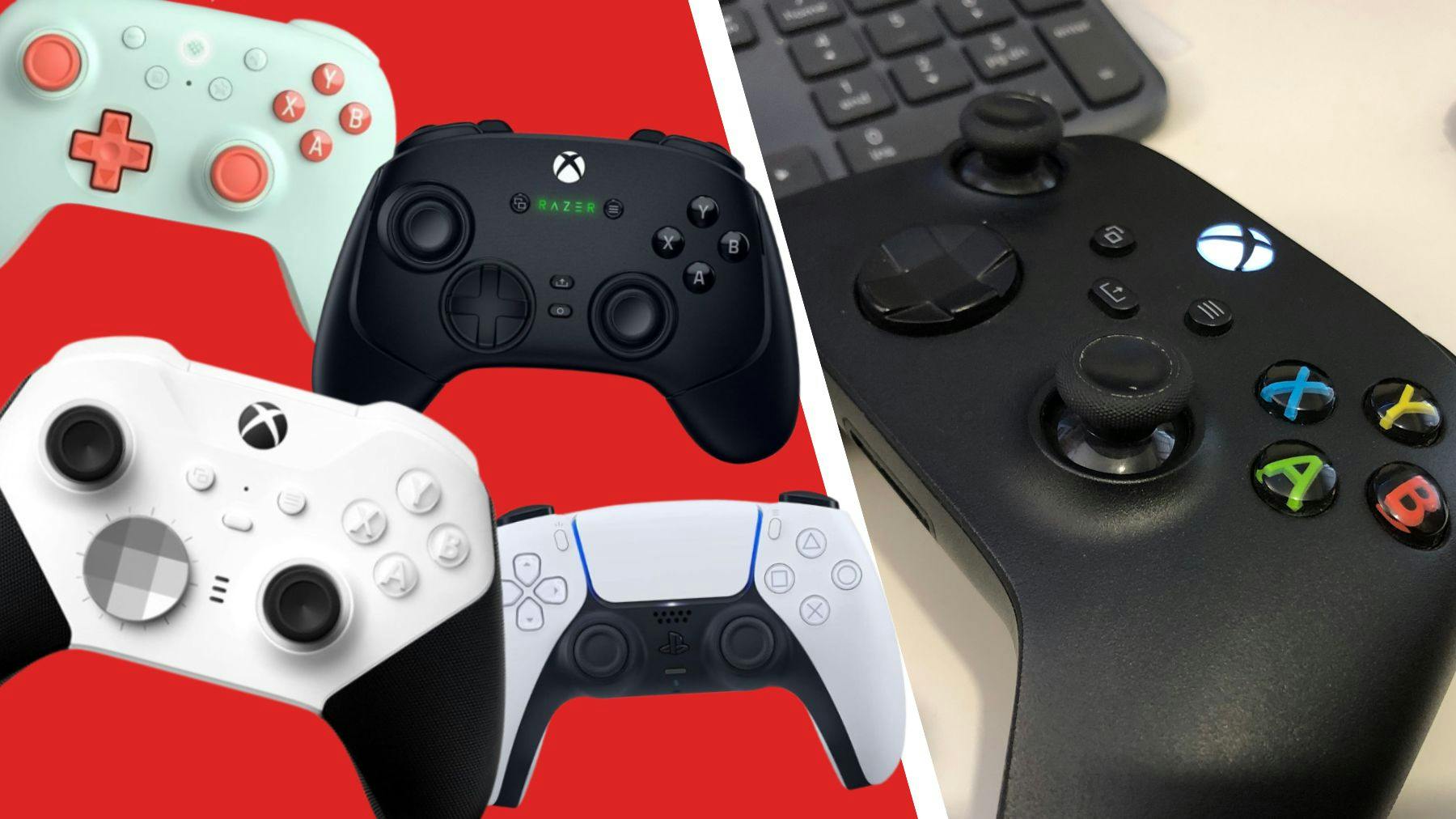
For PC gamers shopping on Amazon, certain brands consistently deliver excellent compatibility and performance. Microsoft's Xbox controllers are often considered the gold standard due to seamless integration with Windows, requiring minimal setup. Their controllers, including the Xbox Series X/S controller, offer reliable wireless connectivity via Bluetooth or the Xbox Wireless Adapter, great ergonomics, and robust build quality. Sony's PlayStation controllers (DualShock 4 and DualSense) are also highly popular, known for their unique features like adaptive triggers and advanced haptics. While they require third-party software (like DS4Windows) for full functionality on PC, many gamers find the effort worthwhile for the immersive experience. Other reputable brands include Logitech, known for value and reliability, and specialized manufacturers like Razer and Scuf, which offer premium, customizable controllers for serious enthusiasts. Always check the specific model's PC compatibility reviews on Amazon before purchasing.
How Can I Ensure My Gaming Controller PC Amazon Purchase is Ergonomic and Comfortable?
Ergonomics are paramount for any PC gamer, especially those who balance work and life and have limited time for pain-free play. When evaluating a gaming controller on Amazon, pay close attention to user reviews specifically mentioning comfort, grip, and hand fatigue. Look for controllers with contoured grips that fit naturally in your hands and well-spaced buttons and joysticks that don't require awkward stretches. The weight distribution of the controller also plays a significant role; a controller that feels balanced in your hands will be more comfortable over long sessions. Some gamers prefer the symmetrical stick layout of PlayStation controllers, while others find the asymmetrical Xbox layout more natural. Consider your own hand size and finger length. Pictures on Amazon can only tell you so much; reading detailed user feedback on how the controller feels after hours of gaming is your best bet for avoiding discomfort and finding that perfect ergonomic fit.
What Are the Best Budget-Friendly Gaming Controllers for PC on Amazon?
Finding a quality gaming controller PC Amazon offers doesn't always require a hefty investment. Many excellent budget-friendly options provide a fantastic experience without compromising too much on features or durability. Look for officially licensed third-party controllers from brands like PowerA, PDP, or 8BitDo, which often mimic the design and functionality of Xbox or PlayStation controllers but at a lower price point. These typically offer reliable wired or wireless connectivity and standard button layouts. When browsing Amazon, filter by customer rating and read reviews to ensure the budget option isn't plagued by common issues like stick drift or unresponsive buttons. Sometimes, opting for a slightly older generation official controller, like an Xbox One controller instead of a Series X/S, can save you money while still delivering premium performance and compatibility for your PC gaming needs.
How Do I Set Up and Troubleshoot My New Gaming Controller for PC?
Setting up your new gaming controller from Amazon for your PC is usually straightforward. For most modern controllers, especially Xbox-compatible ones, simply plugging in a wired controller or connecting a wireless one via Bluetooth or a dedicated dongle will automatically install drivers. On Windows, verify recognition in "Devices and Printers" or "Bluetooth & other devices." If you encounter issues, here are common troubleshooting steps: Update your PC's drivers, especially USB and Bluetooth drivers. Install necessary third-party software (e.g., DS4Windows for PlayStation controllers). Check game-specific settings, as some titles require controller mapping. Restart your PC and controller. For wireless issues, ensure the controller is charged and there's no interference. If problems persist, consult the controller's manual or the manufacturer's support website. Amazon reviews often contain troubleshooting tips from other users, which can be incredibly helpful for niche issues.
Which PC Games Benefit Most from a Gaming Controller, and Are There Specific Amazon Recommendations?
While mouse and keyboard reign supreme for many PC genres, a gaming controller from Amazon can revolutionize your experience in others. Action-adventure games (e.g., Elden Ring, Assassin's Creed), racing simulations (Forza Horizon, F1), fighting games (Street Fighter, Mortal Kombat), and platformers (Ori and the Will of the Wisps) often feel more intuitive and immersive with a controller's analog stick precision and haptic feedback. Even many popular cozy and social games trending this month, which prioritize relaxation and cooperative play, are excellent with controllers, allowing for a more laid-back experience on the couch. For recommendations, consider checking Amazon's "Customers Also Bought" or "Frequently Bought Together" sections for popular games paired with specific controllers. Look for bundles or customer reviews that specifically mention excellent controller support for your favorite titles.
How Can I Keep My Gaming Controller Updated and Maintained for PC Gaming?
Proper maintenance and updates can significantly extend the life and performance of your gaming controller PC Amazon purchase. Regularly update your controller's firmware via the manufacturer's software (e.g., Xbox Accessories app, PlayStation Updater) to ensure optimal compatibility and access to new features. Keep the controller physically clean by wiping it down with a soft, damp cloth, paying attention to crevices around buttons and joysticks where grime can accumulate. Avoid dropping your controller, as internal components are delicate. If you have a wireless controller, manage battery health by avoiding constant overcharging and storing it at a moderate charge level if not used for extended periods. For stick drift or button issues, sometimes calibration tools (built into Windows or third-party software) can help, but severe issues might require professional repair or replacement. Simple care goes a long way in ensuring your controller remains a reliable companion.
What Are the Future Trends for Gaming Controllers on PC, and What Should I Look for on Amazon?
The future of gaming controllers for PC is exciting, constantly evolving with innovations in haptics, adaptive triggers, and even modular designs. Expect to see more advanced haptic feedback that offers nuanced sensations beyond simple rumble, enhancing immersion. Adaptive triggers, like those on the DualSense, which can simulate varying resistance, will likely become more common. Modular controllers that allow swapping out joysticks, D-pads, and buttons for different play styles or genres are also gaining traction. Furthermore, increased focus on cross-platform compatibility and cloud gaming services means controllers will need to seamlessly connect to various devices. When shopping on Amazon, keep an eye out for controllers touting these next-gen features. While they might come at a premium now, these innovations represent the cutting edge, offering a glimpse into how you'll interact with games in the coming years. Budget-friendly versions of these technologies will eventually emerge, so staying informed about new releases and tech trends on Amazon can help you future-proof your setup.
Navigating the world of PC gaming controllers on Amazon can seem overwhelming, but with the right knowledge, it transforms into an opportunity to truly enhance your gaming life. We’ve covered everything from choosing the ideal model to ensuring ergonomic comfort and troubleshooting common issues, all to help you maximize your limited, yet precious, gaming time. Remember, the best gaming controller PC Amazon offers is one that fits your hands, your games, and your budget, allowing you to relax, have fun, and even build skills without unnecessary hassle. By making an informed choice, you’re not just buying a peripheral; you’re investing in countless hours of immersive, enjoyable gameplay.
What’s your biggest gaming challenge when it comes to controllers or other hardware? Comment below! We love hearing from fellow gamers and helping you find those perfect solutions.
Frequently Asked Questions About Gaming Controllers for PC on Amazon
Q: Do all PC games support controllers?
A: No, not all PC games natively support controllers. While most modern titles and many indie games do, competitive first-person shooters and real-time strategy games are often designed primarily for mouse and keyboard. Always check a game's system requirements or in-game settings for controller compatibility before you start playing.
Q: Can I use a PS5 DualSense controller on my PC from Amazon?
A: Yes, you can use a PS5 DualSense controller on your PC. It connects via USB-C or Bluetooth. While basic functionality works, to unlock advanced features like adaptive triggers and haptic feedback in all games, you'll often need third-party software like DS4Windows or ensure the game has native DualSense support, which is becoming more common.
Q: Are cheap Amazon controllers worth it?
A: Cheap controllers on Amazon can be a mixed bag. Some offer great value for casual gaming, but others might suffer from poor build quality, input lag, or rapid wear and tear. Always read recent reviews focusing on durability and performance before purchasing a very inexpensive option. Sometimes, spending a little more for a reputable brand or a slightly older official controller pays off in the long run.
Q: How important is haptic feedback in a PC controller?
A: Haptic feedback, or rumble, significantly enhances immersion by providing tactile responses to in-game events like explosions, impacts, or terrain changes. While not essential for gameplay, it adds a layer of realism and can make gaming more engaging. For many gamers, especially those seeking immersive experiences in adventure or racing games, advanced haptics are a highly valued feature.
Q: Can I use my old console controller (e.g., PS4, Xbox One) for PC gaming via Amazon?
A: Absolutely! Older generation Xbox One and PS4 (DualShock 4) controllers are excellent and widely compatible with PCs. Xbox One controllers connect seamlessly via Bluetooth or the Xbox Wireless Adapter, while DualShock 4 controllers connect via Bluetooth and often benefit from DS4Windows for full functionality. These older models are often available at great prices on Amazon.
Q: What should I do if my controller has stick drift?
A: Stick drift is a common issue where the controller registers input even when the joystick isn't being touched. First, try recalibrating your controller through Windows settings. If that doesn't work, clean around the joystick base with compressed air. For persistent issues, updated firmware might help. If all else fails, it may indicate a hardware fault requiring repair or replacement, especially if the controller is still under warranty.
Simplified guide for finding the best gaming controller on Amazon for PC; Solutions for common compatibility and setup issues; Tips for optimizing performance and ergonomics; Budget-friendly recommendations for quality controllers; Expert advice on popular brands and features.
35


Best PC Gaming Controllers 2026 U2014 Wired Wireless Picks SL1500 . 15 Best Gaming Controllers For PC In 2026 Ultimate Guide To Top Picks Top Pc Gaming Controllers Mwqqb 800x450 . Best PC Gaming Controllers 2026 U2014 Wired Wireless Picks 71PP K4uX8L. SL1500 . EasySMX X15 Controller PC PC Controller Wireless Mit 7 RGB Licht 712YP2v0vpL . 15 Best Gaming Controllers For PC In 2026 The Ultimate Guide To Top Top Pc Gaming Controllers Xpepp


Controller Pc How To Use New Xbox Series X Controllers On PC Best Pc Gaming Controllers 2024 Cnnu 1 . Amazon Com YCCSKY Wireless PC Gaming Controller For Windows 7 8 10 11 SL1500 . 9 Best PC Gaming Controllers March 2026 Reviewed Models 41cyiuI3lJL . Best Controllers For PC In 2026 Recommended By Gaming Experts PC Controllers Hero 1 . Top 5 Best Budget Wireless Gaming Controllers For PC On Amazon In 2026 D96ecc3f 07bf 4f88 Bab8



The Best Controllers For PC Gaming In 2026 00 Banner Best Controllers 2026 0fbaf183 5040 4839 B20a . Best PC Controllers For Gamers In 2026 Best Pc Controllers . Best Gaming Controller For PC 2026 Tested Ranked SL1300 . Best Retro Gaming Controllers 2026 Tested Picks For SNES Genesis And SL1500 . 15 Best Amazon Prime Day Gaming Controller Deals July 2026 Massive Best Amazon Prime Day Gaming Controller Deals


15 Best Amazon Prime Day Gaming Controller Deals July 2026 Top Rated Best Amazon Prime Day Gaming Controller Deals . 15 Best Amazon Prime Day Gaming Controller Deals July 2026 Hottest Deals Best Amazon Prime Day Gaming Controller Deals . 10 Best Amazon Prime Day Gaming Controller Deals July 2026 Massive Best Amazon Prime Day Gaming Controller Deals . Best Wireless Gaming Controller In 2026 Complete Buyer S Guide Gaming SL1500 . Best Mobile Gaming Controllers In 2026 Gaming PC Guru SL1500



8 Best Amazon Prime Day Gaming Controller Deals July 2026 Top Picks Best Amazon Prime Day Gaming Controller Deals 2 . Top 10 Best Gaming Controllers For PC 2026 Expert Verified Techzaru Product B0FJFM1NVY . Amazon Com EasySMX X15 PC Controller Enhanced Wireless Bluetooth 71x EpM6ziL. SL1500 . Top 10 Best Pc Gaming Controller On Amazon 2026 YouTube . Amazon Com Enhanced Bluetooth Controller Hall Effect Joysticks SL1500

Best Gaming Chairs In 2026 For Upgraded Comfort Stuff Best PS5 Controllers . The 7 BEST BUDGET Gaming Controllers For PC On Amazon 2026 Value . Quick Amazon Is Flogging The Best PC Gaming Controller For Just AU 135 1024 80 . The Best Gaming PC 2026 Find Your Perfect Pre Built Powerhouse . Top 5 Best Budget Wireless Gaming Controllers For PC On Amazon In 2026 91d56c7c 98da 4d48 A3f7


12 Best PC Gaming Controllers July 2026 Expert Reviews SL160 . Best Pro Controllers For Xbox And PS5 In 2026 Gaming PC Guru 518jo YbMIL. SL1080 . 15 Best Gaming Controllers For PC In 2026 Ultimate Picks For Every Wireless Gaming Controller Ejh71 . 15 Best Amazon Prime Day Gaming Controller Deals June 2026 Best Amazon Prime Day Gaming Controller Deals 1024x572 . 2026 Amazon Big Spring Sale Gaming Deals To Grab Before It S Too Late Switch 2 Wireless Controllers